Subscriptions and recurring revenue

Meal Prep Subscription Software: Weekly Plans That Run Themselves

Customers sign up once, then skip a week, swap meals, pause or cancel on their own. You get a week you can plan around, billed on your own Stripe account.

The problem

Every week I am chasing the same people in DMs and texts: are you in this week, which meals do you want, did you pay? One missed message and my numbers for the week fall apart.

I want people to sign up once and have the week run itself, and I do not want to lose them just because they are traveling for a week.

How it works

Real screens from the live demo, with sample data only.

What your customer sees

Pick a plan and start

Customers choose a weekly plan (a set number of meals at a price per meal), pick delivery or pickup and confirm. On your own site the customer adds a card through Stripe, on your own Stripe account, and each week is billed after its ordering deadline.
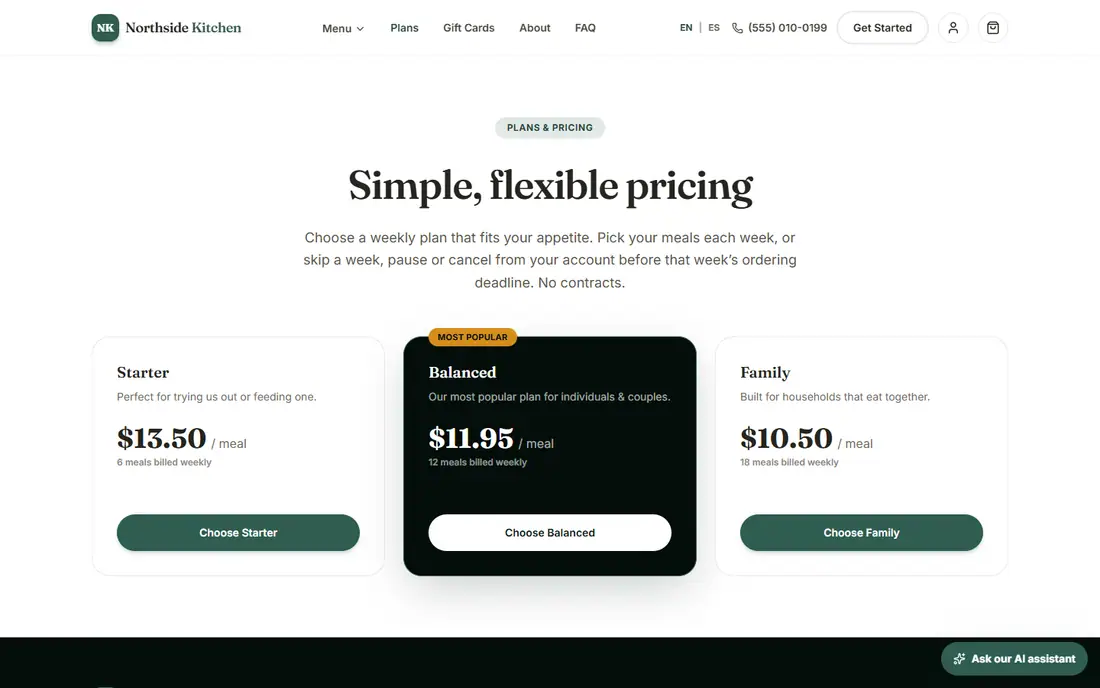
The demo storefront plans page with three weekly plans and a price per meal
The plans page. In the demo nothing is charged.

What your customer sees

Skip, pause, swap or cancel before the deadline

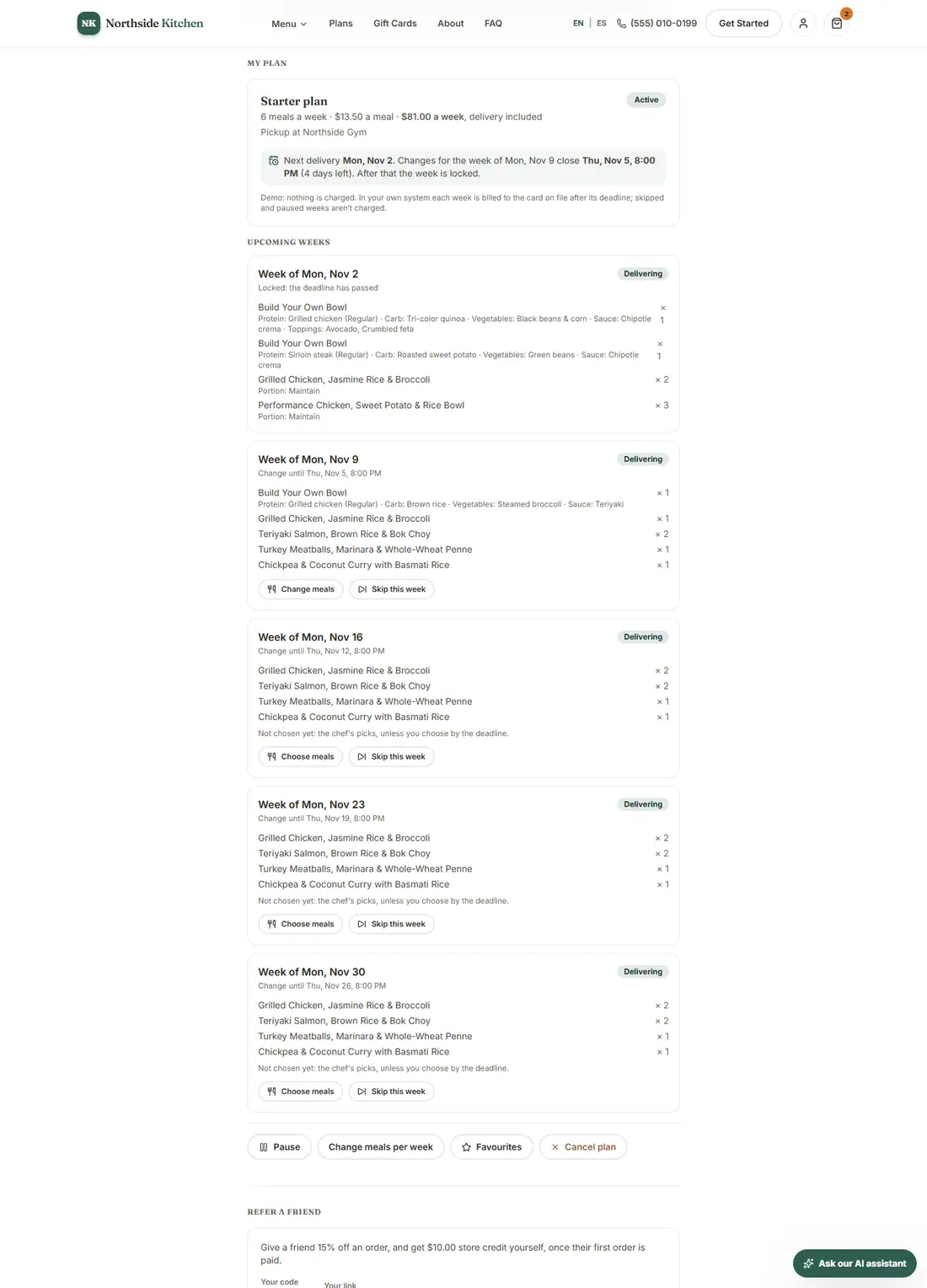
On their account page customers see their plan, their next delivery and the coming weeks, with the deadline for changes.

  • Skip any week: no delivery and no charge.
  • Choose different meals for a week, or let the saved favorites or your chef's picks fill it in.
  • Pause the whole plan until a date, switch to more or fewer meals a week, or cancel.
  • Once a week's deadline passes it locks, and your kitchen plans around it.
A customer's My Plan page with the upcoming weeks and options to skip, swap or pause
My Plan, as the customer sees it.

What you see in the admin

See every subscriber and step in when needed

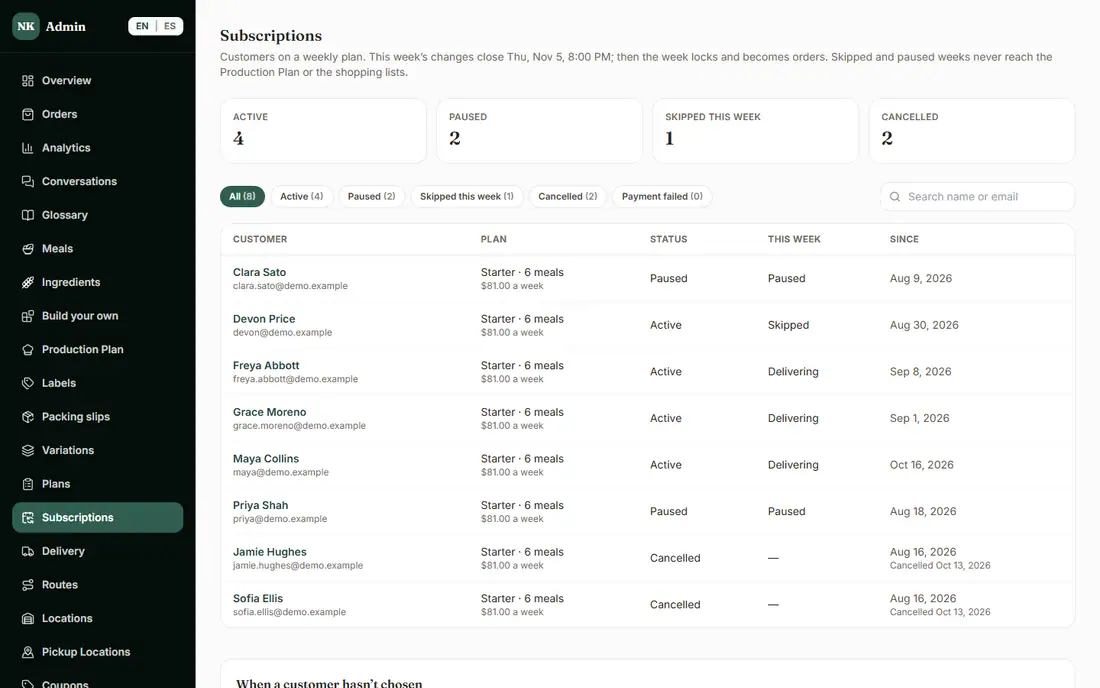
The Subscriptions page lists every subscriber with what they are doing this week: delivering, skipping or paused. Filter by active, paused, skipping this week, cancelled or failed payment, and search by name.

  • Open a customer to see exactly what they see, and skip a week, choose meals, pause, change meals per week or cancel for them. Every change is in the Audit Log.
  • Choose what a customer gets when they do not pick their meals: their favorites or your chef's picks.
  • On your own site a declined weekly payment is flagged here and on Orders, and the customer is emailed a link to update their card.
  • If you ever pause billing or stop new sign-ups, customers with a weekly plan get an email about it in English or Spanish, on top of the notice in their account.
The admin Subscriptions page with counts of active, paused, skipping and cancelled plans
Subscriptions in the admin.

What is included, and in which plan

Each plan includes everything in the plans before it.

  • Weekly plans

    Customers subscribe to a weekly plan and are billed each week.

    In Basic and above

How it helps you grow

  • Recurring revenue you can plan around

    Subscribers are billed every week after the ordering deadline, so you know what is coming before you shop and cook.

  • A kinder alternative to cancelling

    A customer who is away for a week can skip it in a couple of taps instead of cancelling by text, and is still on your plan when they are back.

  • Less admin time

    The plan places each week's order for the customer. You stop collecting orders by message and start from a list that is already there.

Try it in the demo

These links open the exact screens in the live demo, in a new tab. Nothing in the demo is real: no payments, no emails, no customers.

Admin links ask you to click Sign In once. The demo fills in the sample login for you.

Questions owners ask

Can customers skip a week or pause on their own?

Yes. Before a week's ordering deadline they can skip it, swap its meals, pause the plan until a date, change how many meals they get or cancel. After the deadline the week is locked so your kitchen can plan around it.

Where does the money go, and do you take a cut of each order?

Payments go to your own Stripe account. There is no per-order platform fee from us. Stripe's own processing fees still apply, as they do with any card payment.

What happens when a weekly payment fails?

On your own site the failed payment is flagged on the Subscriptions page and on Orders, and the customer is emailed a link to update their card.

Can I pause billing for everyone, for example if I close for a week?

Yes. In Settings > Features you can pause all weekly-plan billing or just stop new sign-ups. The screen shows who is affected first, customers get an email about it in their language, and turning weekly plans back on resumes exactly those plans.

Related features

  • Delivery and pickup

    ZIP zones, delivery days and deadlines, pickup locations, route sheets and packing slips.

  • Kitchen operations

    Production plan, prep and shopping lists, inventory, ingredient costs and suppliers, and more than one kitchen.

  • Reports and insights

    Analytics, repeat rate and churn, CSV exports and a sales tax report.

All features →

Want to see it with your menu?

We set it up for you and move your existing customers over. Call us or talk to Alex, and we will show you how it would work for your business. You can also read the demo guide first.