Pest control

Built for pest control companies

A website that gets found, an assistant that answers when the office is closed, and an office system that keeps licences, hiring and termite contracts straight — in English and Spanish, for pest control companies across Florida and Georgia.

Turn features on when you are ready

You do not buy the whole system on day one. Each part is a switch, and the ones in your admin area are yours to move. Flip them below and watch the site and the admin area change — this is a demo of the real panel, with sample data.

Built — ready to switch onThe switch panel is built, deployed and working in the platform today. It is switched on for your company when you are ready — no client is obliged to take it before then.

Admin › Settings › Features

Try it: flip a switch.

Switching something off hides and blocks it. It never deletes: every record stays exactly where it is, and turning the switch back on brings it all back as it was.

Switches in your admin area

Owner-only. An office admin sees every switch and its state but cannot move one, and that is enforced by the database, not by a greyed-out box.

  • The contract file: write a new agreement, keep the signed ones, hold the scanned paper originals, and search the lot.

    Applies immediately.

  • Email a contract to the customer to sign on their phone, chase it with a resend, and void one that went out wrong. Off means staff still write and print contracts; nothing is emailed.

    Applies immediately.

  • Whether wood-destroying-organism inspections are for sale. Off hides the WDO page, its nav and homepage card, keeps the URL out of your sitemap, and stops the voice assistant offering it.

    Rebuilds the public site, about a minute.

Chosen when we build

These two are decided when we build your site rather than toggled in Settings. They change the site just as much, so the preview reacts to them too.

  • A full Spanish version with its own addresses and an EN | ES toggle, so Spanish-speaking customers can read your site and find it in Spanish.

    Chosen when we build

  • An AI voice assistant on your website that answers pest questions in English or Spanish, then takes the caller’s details as a lead.

    Chosen when we build

What changes

Your website

Sample Pest Co.HomeTermitesRodentsMosquitoesContactEN | ES

Pest control you can book today

Book onlineTalk to JessCall

Services

  • General pest
  • Termites
  • Rodents
  • Mosquitoes

WDO inspections hidden from the site · Rebuilds the public site, about a minute.

Your admin area

  • Dashboard
  • Staff
  • Credentials
  • Training Log
  • Applicants
  • Onboarding
  • Contracts
  • Documents
  • Settings

Contracts

Sample, A. — 123 Example Rd

Draft

Sample company, sample data. Not a real customer record.

Basic, Pro, Advanced

Three packages, each one everything in the package before it plus the next layer. Start where you are and move up when the business is ready — nothing is rebuilt to get there.

  1. Basic

    Get found

    A site people find, and a lead that always reaches you.

    • Fast, mobile-first website
    • A page for every service you sell
    • Pest library: a page per pest people search for
    • Service area ZIP checker and map
    • Sticky Call and Book bar on phones
    • Google Business Profile set up
    • Titles, descriptions, structured data and sitemap
    • Lead and booking forms, built for text-message rules
    • Referral tracking, so you know who sent the lead
    • Hosting, updates, backups and monitoring
    • Monthly care plan with set response times

    Pricing after a free 30-minute audit.

    Book a free intro call
  2. Most popular

    Pro

    Answer every lead

    Nobody waits for the office to open.

    Everything in Basic, plus:

    • Spanish site with an EN | ES toggle and its own URLs Built — ready to switch on
    • One automated lead intake into your CRM, with notifications
    • An AI voice assistant on your website, in English
    • The same voice assistant in Spanish Built — ready to switch onSwitched on together with the Spanish site.
    • Pest Analyzer: a customer's photo becomes a lead
    • Feature switches you hold yourself — e.g. WDO inspections on or off Built — ready to switch on
    • Staff records with owner, office and technician roles
    • Licensing tracker with a 30/60/90-day expiry dashboard
    • Training log and route-ready status per technician
    • Careers page and applicant pipeline
    • Onboarding checklists with due dates
    • Private document storage for staff files
    • "My status" phone view for technicians
    • One daily email of what expires and what is overdue

    Pricing after a free 30-minute audit.

    Book a free intro call
  3. Advanced

    Run the office

    The paperwork and the phone look after themselves.

    Everything in Pro, plus:

    • Review requests to customers who opted in Service, not softwareAn automation we build and run for you, not a feature of the website.
    • Digital termite contracts, filed A–Z and searchable Built — ready to switch on
    • Cancel, renewal and retention dates worked out for you Built — ready to switch on
    • E-signature: the customer signs on their phone Built — switches on once your e-signature account is connectedConnect your signing account and the switch turns it on.
    • Paper-contract import, with a person checking every field Built — ready to switch on
    • Protected originals that cannot be replaced or deleted Built — ready to switch on
    • Audit packet: one PDF for an inspector, not four links Built — ready to switch on
    • Renewals tracking and reminders Built — ready to switch on
    • AI answering on your main phone line Service, not softwareA CG Strategic service alongside the platform, not part of the website.
    • Missed-call follow-up Service, not softwareTexting depends on carrier (A2P) approval.
    • Custom automations and CRM sync Service, not softwareBuilt to your workflow after the audit, and run alongside the website.

    Pricing after a free 30-minute audit.

    Book a free intro call

Items with no label are in use with a pest control client today. Everything labelled is built and working, and switches on for you when you are ready. The full table below labels every one.

What is in each package

The full list, so nothing is hidden behind a "and more".

What the labels mean

In use with a client
Running in production with a client today.
Built — ready to switch on
Built and working; switched on for a client when they are ready.
Built — switches on once your e-signature account is connected
Built and working; it switches on for your company once your e-signature account is connected.
Service, not software
Something we run alongside the platform rather than part of the website.
What is in each package
FeatureBasicProAdvanced
Your website
Fast, mobile-first websiteIn use with a clientIncludedIncludedIncluded
A page for every service you sellIn use with a clientIncludedIncludedIncluded
Pest library: a page per pest people search forIn use with a clientIncludedIncludedIncluded
Service area ZIP checker and mapIn use with a clientIncludedIncludedIncluded
Sticky Call and Book bar on phonesIn use with a clientIncludedIncludedIncluded
Spanish site with an EN | ES toggle and its own URLsBuilt — ready to switch onNot includedIncludedIncluded
Getting found
Google Business Profile set upIn use with a clientIncludedIncludedIncluded
Titles, descriptions, structured data and sitemapIn use with a clientIncludedIncludedIncluded
Leads
Lead and booking forms, built for text-message rulesIn use with a clientIncludedIncludedIncluded
Referral tracking, so you know who sent the leadIn use with a clientIncludedIncludedIncluded
One automated lead intake into your CRM, with notificationsIn use with a clientNot includedIncludedIncluded
Review requests to customers who opted inService, not softwareAn automation we build and run for you, not a feature of the website.Not includedNot includedIncluded
AI on your site
An AI voice assistant on your website, in EnglishIn use with a clientNot includedIncludedIncluded
The same voice assistant in SpanishBuilt — ready to switch onSwitched on together with the Spanish site.Not includedIncludedIncluded
Pest Analyzer: a customer's photo becomes a leadIn use with a clientNot includedIncludedIncluded
Your control
Feature switches you hold yourself — e.g. WDO inspections on or offBuilt — ready to switch onNot includedIncludedIncluded
The office
Staff records with owner, office and technician rolesIn use with a clientNot includedIncludedIncluded
Licensing tracker with a 30/60/90-day expiry dashboardIn use with a clientNot includedIncludedIncluded
Training log and route-ready status per technicianIn use with a clientNot includedIncludedIncluded
Careers page and applicant pipelineIn use with a clientNot includedIncludedIncluded
Onboarding checklists with due datesIn use with a clientNot includedIncludedIncluded
Private document storage for staff filesIn use with a clientNot includedIncludedIncluded
"My status" phone view for techniciansIn use with a clientNot includedIncludedIncluded
One daily email of what expires and what is overdueIn use with a clientNot includedIncludedIncluded
Contracts and compliance
Digital termite contracts, filed A–Z and searchableBuilt — ready to switch onNot includedNot includedIncluded
Cancel, renewal and retention dates worked out for youBuilt — ready to switch onNot includedNot includedIncluded
E-signature: the customer signs on their phoneBuilt — switches on once your e-signature account is connectedConnect your signing account and the switch turns it on.Not includedNot includedIncluded
Paper-contract import, with a person checking every fieldBuilt — ready to switch onNot includedNot includedIncluded
Protected originals that cannot be replaced or deletedBuilt — ready to switch onNot includedNot includedIncluded
Audit packet: one PDF for an inspector, not four linksBuilt — ready to switch onNot includedNot includedIncluded
Renewals tracking and remindersBuilt — ready to switch onNot includedNot includedIncluded
Phone and follow-up
AI answering on your main phone lineService, not softwareA CG Strategic service alongside the platform, not part of the website.Not includedNot includedIncluded
Missed-call follow-upService, not softwareTexting depends on carrier (A2P) approval.Not includedNot includedIncluded
Custom automations and CRM syncService, not softwareBuilt to your workflow after the audit, and run alongside the website.Not includedNot includedIncluded
Hosting and care
Hosting, updates, backups and monitoringIn use with a clientIncludedIncludedIncluded
Monthly care plan with set response timesIn use with a clientIncludedIncludedIncluded

Pricing after a free 30-minute audit.

A closer look

Six of the pieces, and what each one actually does. Each says which of the two it is: in use with a pest control client today, or built and working and ready to switch on for yours.

In use with a client
Running in production with a client today.
Built — ready to switch on
Built and working; switched on for a client when they are ready.

In use with a client

A voice assistant that knows your pests

A caller asks what is eating their lawn at nine in the evening. The assistant answers from a Northeast Florida knowledge base built on university extension research, then takes their details so the lead is waiting for you in the morning. This is running on a pest control site today.

  • Answers from your services and your area, not the whole internet
  • Every call ends as a lead in the same place as your forms
  • A daily cap on calls, so the bill cannot run away
  • Spanish, with no "press 2 for Spanish" — built and ready to switch on
  • Follows your feature switches, so it stops offering a service you turn off
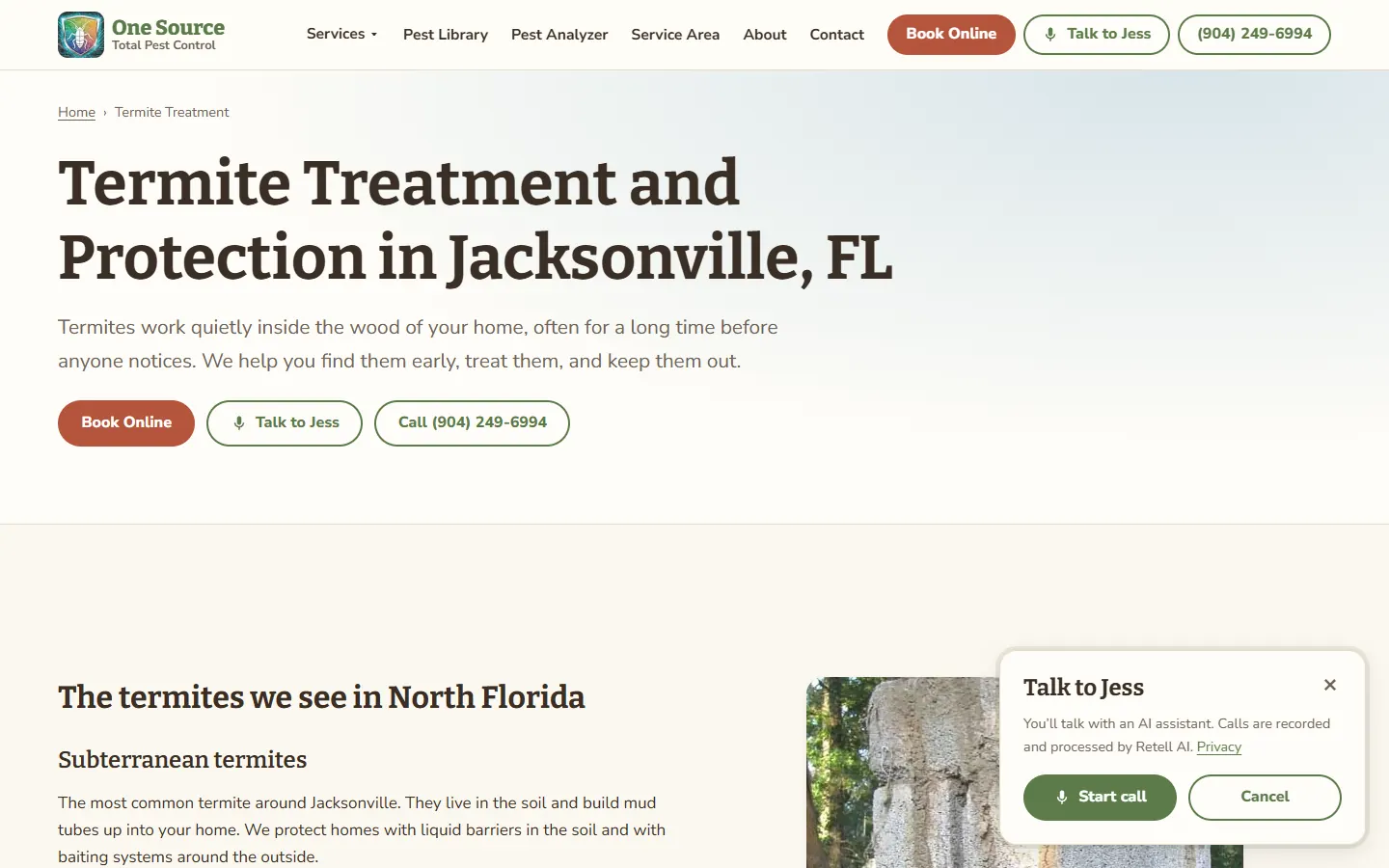
Talk to Jess panel open on a pest control termite page, explaining that calls are with an AI assistant, with Start call and Cancel buttons
The assistant panel on a service page

In use with a client

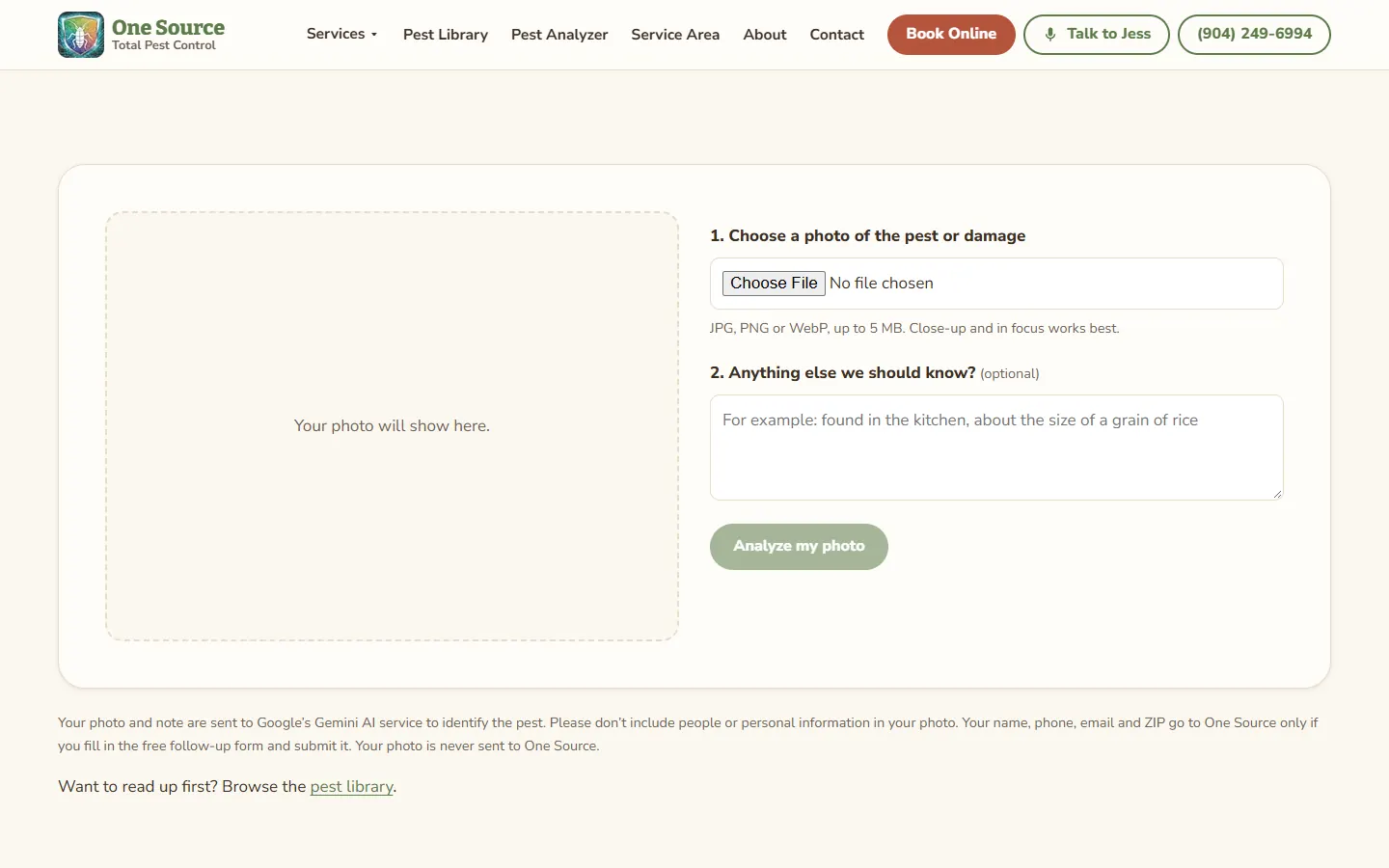
A photo becomes a lead

Customers do not know the name of the bug. They do have a photo. They upload it, get a first-guess identification with how confident it is and what to do next, and the lead arrives with the photo and a suggested service already attached.

  • A first guess, with its confidence shown plainly — never a diagnosis
  • Points at the right service page, so the next click is a booking
  • An optional follow-up form turns the visit into a named lead
  • Rate-limited, so nobody can run up your AI bill
Pest Analyzer page on a pest control website: a photo drop area beside the upload field, an optional notes box and an Analyze my photo button
Photo upload on desktop and phone

Built — ready to switch on

The termite file, out of the drawer

Every agreement in one searchable list, filed A–Z by customer. The dates that have to agree with each other — the right to cancel, when the agreement ends, how long the record is kept — are worked out by the system rather than typed three times. When an inspector asks for one, you hand over a single PDF. The whole contract file is built and working in the platform, and it switches on for your company when you are ready.

  • The signed or scanned original cannot be replaced or deleted
  • An audit packet in one file: the record, the timeline, the file fingerprints, the original and the signing certificate
  • Years of paper contracts scanned in batches, with a person checking every field before it counts
  • Owner-only deletion, and retention is a report — never a job that removes files

Contracts

  • Sample, A. — 123 Example RdSignedOriginal on file
  • Example, B. — 45 Sample CtOut for signatureSent
  • Placeholder, C. — 9 Demo LnPaper, importedVerified

Download audit packet (PDF)

Recreated interface with sample data, not a customer record.

Built — ready to switch on

Renewal season stops surprising you

Each agreement knows the month it renews. The contract list filters to what is due, and the same information goes out in one email a day, so the renewal conversation happens before the cover lapses rather than after. It travels with the contract file, so it switches on at the same time.

  • A renewals-due filter on the contract list
  • The renewals section of the daily email, with the fee
  • The daily email itself is already in use for expiring licences and overdue onboarding
  • Switch the reminders off and the renewal months stay on the records

Daily email — renewals due

  • Sample, A.March$ renewal fee
  • Example, B.April$ renewal fee

Plus 2 licences expiring and 1 overdue onboarding item

Recreated interface with sample data, not a customer record.

In use with a client

Licences, training and who can run a route

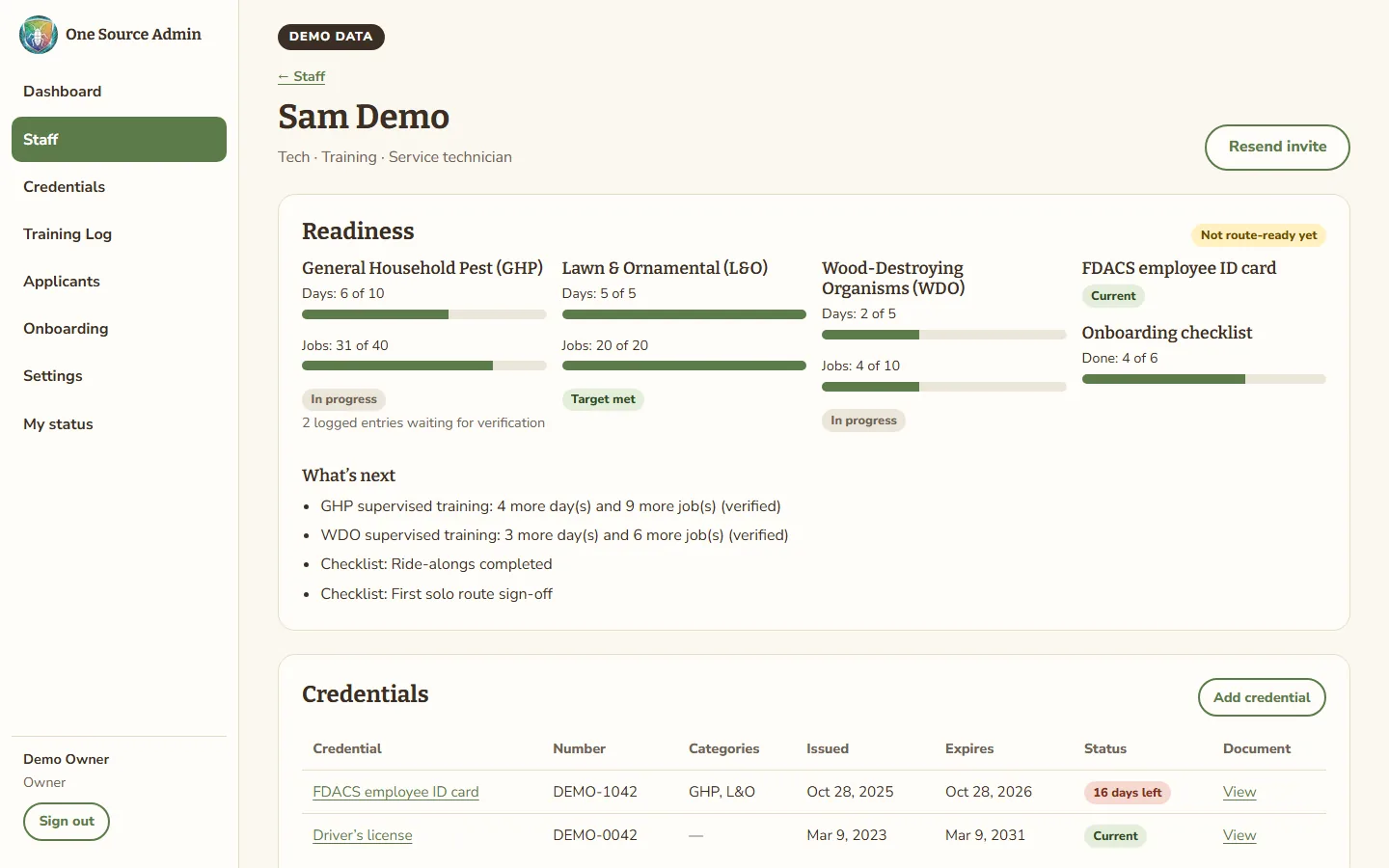
The part of the business a field-service app does not cover. Every ID card, certification and the business licence has an expiry date and a dashboard showing what lapses in the next 30, 60 and 90 days. Each technician has a supervised training log and a plain answer to "are they ready for their own route yet".

  • A 30/60/90-day expiry dashboard, plus the daily email
  • A supervised training log per technician, per category
  • Route-ready status, with what is still missing spelled out
  • Applications from your careers page land in one pipeline; hiring creates the staff record and the onboarding checklist
  • Technicians check their own status on their phone instead of calling the office
Mock of a technician's page in a pest control admin area: supervised training progress for each licence category, ID card status, onboarding progress and what is left before they are route-ready
A technician's readiness (mock-up with sample data)

Built — ready to switch on

A Spanish site, not a translate button

Every page exists twice, each with its own address, so a Spanish-speaking customer can find you in Spanish and share a link that stays in Spanish. The admin area is bilingual too. It is written, built and working in the platform, and it switches on for your company when you are ready.

  • Its own URLs, so Spanish pages can rank in Spanish
  • One tap between EN and ES, and the choice is remembered
  • The voice assistant and the contract templates both have a Spanish version, and they switch on with it
  • Noting who on your staff speaks Spanish is already in use, so you can staff a route on purpose
  • Every line reviewed by a native speaker before it goes live

The same page, twice

  • yourcompany.com/termite-treatmentEnglishEN
  • yourcompany.com/es/termite-treatmentSpanishES

Search engines are told the two are the same page in different languages.

Recreated interface with sample data, not a customer record.

The first build

See it on a real pest control site

We built this with One Source Total Pest Control in Jacksonville. Their office uses the admin area every day — staff, licensing, training, hiring, onboarding and the daily email — and the site runs the photo analyzer, the voice assistant and one lead intake. The newer parts — the contract file, the switch panel and the Spanish site — are built and working in the platform, ready for the day they switch them on. The case study walks through what was there before and what replaced it.

Read the One Source case study

Questions pest control owners ask

Who owns the website and the data?

You do. Your customer and contract records, your domain, your brand, photos and content, and your payment account are yours, and you can export your data at any time. The platform software is licensed to you through the monthly care plan, which is what keeps it hosted, patched and supported. If you ever leave, you take your data, domain, content and payment account with you. If you would rather run the platform yourself, there is an option to buy out the software licence.

How do the feature switches work?

Each part of the system is a row in one registry that owns the pages, menus and endpoints it controls, so switching it off takes all of them with it and cannot leave a page reachable that somebody forgot to guard. Only the owner can move a switch. Switches inside the admin area apply immediately; ones that change the public site rebuild it in about a minute. Nothing is deleted either way, and a feature that depends on another cannot be switched on until its parent is. Where this stands: the panel is built, deployed and working in the platform, and it is switched on for your company on the day you are ready.

Can I start with Basic and add the rest later?

Yes, that is the point of building it this way. Moving from Basic to Pro or Pro to Advanced switches the next layer on, on the same site, with the same addresses and the same content. There is no rebuild and no second launch.

What does the e-signature need before it works?

Your own e-signature account, connected to us. The feature itself is built and working, and it ships switched off, because sending a contract out for signature uses an account that is yours rather than ours. Switching it on shows the short checklist of what has to be connected first: the signing templates in each language, the API key held in your automation account rather than the website, and the send automation switched on with its callbacks pointed at your site. Connect the account and the switch turns it on.

Do I need the Spanish site?

That depends on your area and your crews. Where it earns its keep, it earns it twice: Spanish-speaking customers can read and share your site, and the pages can rank in Spanish instead of competing with your English ones. The voice assistant and the contract templates both have a Spanish version. Where it stands today: the Spanish site and the Spanish half of the voice assistant are built and working in the platform, ready to switch on for your company, and every line is reviewed by a native speaker before your pages go live.

What happens in the free audit?

A 30-minute call, then a short look at how the business runs today: where leads come in and what happens to them, what your current site does and does not rank for, what the office is tracking by hand, and which of the packages actually fits. You get a written quote after that. We do not quote blind, and the call costs nothing.

What does the whole process look like?

Intro call, then the audit, then a requirements session where we write down exactly what you need, then a written quote with a timeline. After that the build, delivered in milestones so you can see it coming together, and then the monthly care plan: hosting, updates, backups, monitoring, support and small changes as you go.

Do I have to change CRMs?

No. The site never replaces your field-service software — scheduling, routing, the technician app and invoicing stay where they are. What we add is the lead intake in front of it and the licensing, hiring and contract side it does not cover, and we connect the two so leads arrive in your CRM in one shape.

Start with the audit

Thirty minutes on the phone, a look at what you have, and a written quote for the package that fits. No prices before that, because we would be guessing.