Delivery and pickup

Meal Prep Delivery Route Planning, Zones, Pickup and Packing Slips

ZIP code zones with their own day and fee, route sheets with stops in a sensible order, pickup spots and a packing slip for every bag.

The problem

Delivery day is chaos. I am sorting addresses in a spreadsheet, texting drivers the order of stops and writing names on bags, and people outside my area keep ordering and then ask for a refund.

I need the system to know where I deliver, when, and what it costs, and to hand my driver a list.

How it works

Real screens from the live demo, with sample data only.

What your customer sees

Customers find out right away if you deliver to them

At checkout the customer's ZIP code finds their delivery zone: its fee, its delivery day and its minimum order. Outside every zone, the customer is told so and offered your pickup locations instead.
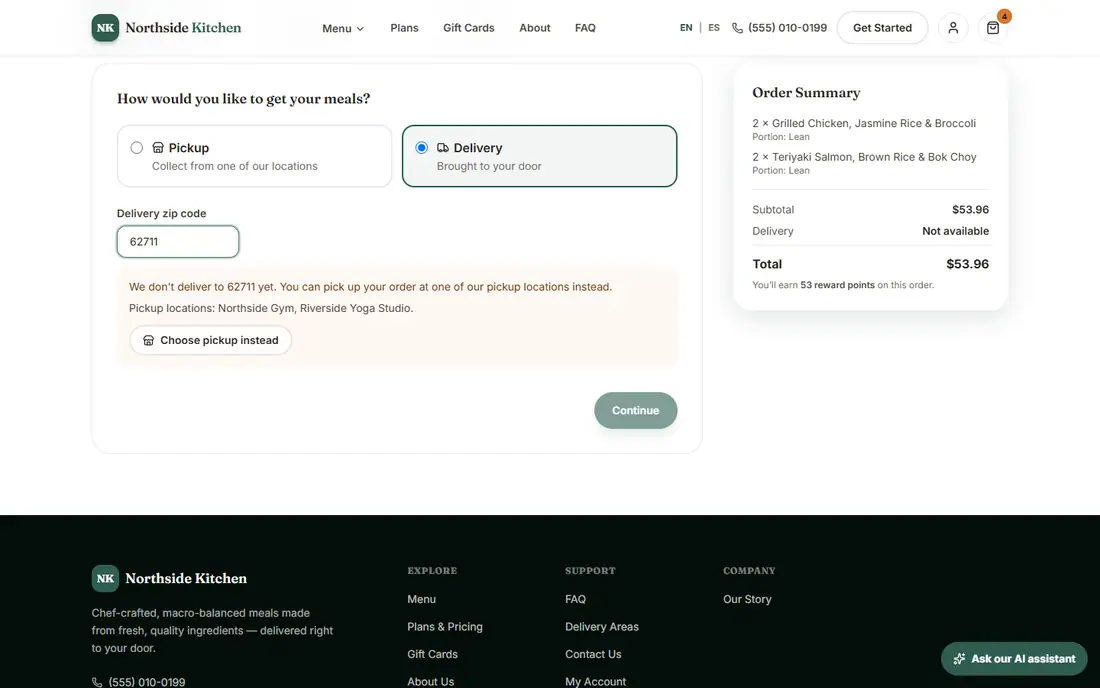
Checkout where a ZIP code outside the zones is offered pickup instead
A ZIP outside the zones is offered pickup.

What you see in the admin

Deadlines, delivery days and zones

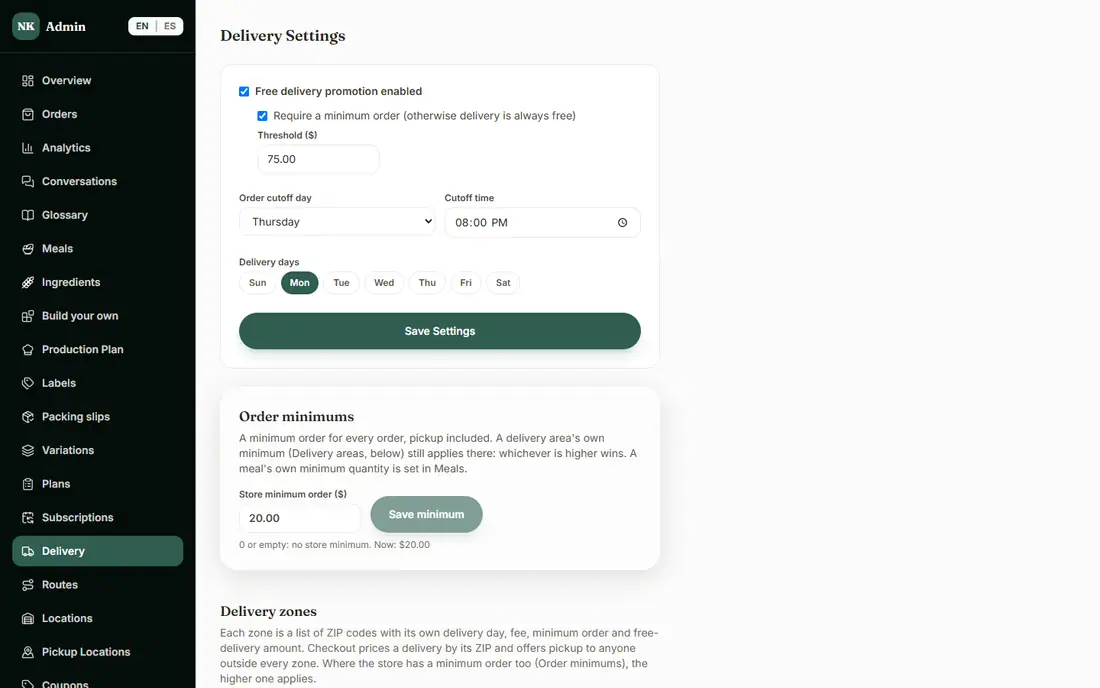
On the Delivery page you set your ordering deadline, your delivery days and your free-delivery threshold. Each zone is a list of ZIP codes with its own delivery day, fee, minimum order and free-delivery amount, and checkout uses them automatically.

The admin Delivery page with the ordering deadline, delivery days and zones
Delivery settings and zones.

What you see in the admin

Route sheets for the delivery day

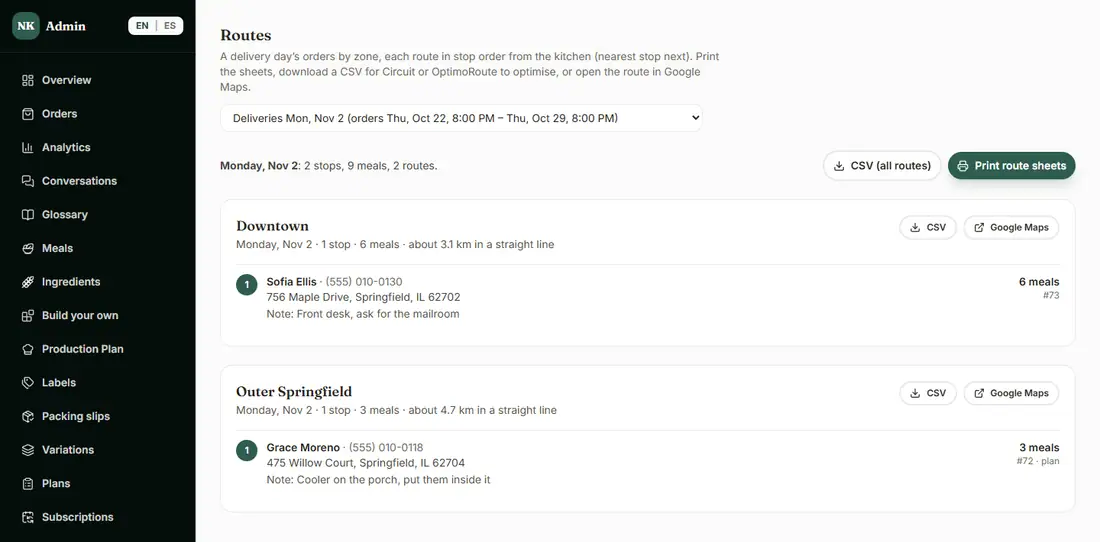
Pick a delivery day and its orders are grouped by zone, with each route's stops in order from your kitchen (nearest stop next), plus name, phone, address, delivery notes and meal count.

  • Print the route sheets for your driver.
  • Download a CSV to take into a route-planning app if you want to optimize further.
  • Open a route in Google Maps (long routes are split into parts, as Google allows).
The admin Routes page with each route's stops in order
Routes for one delivery day.

What you see in the admin

Pickup locations

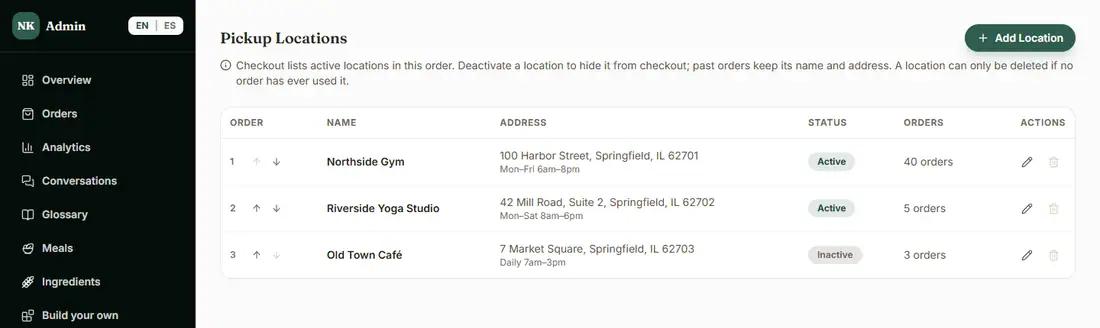
List the places customers can collect their meals, like a gym or a studio. Turn one off and it disappears from checkout, while past orders keep its name and address.

The admin Pickup Locations page
Pickup locations.

What you see in the admin

A packing slip for every order

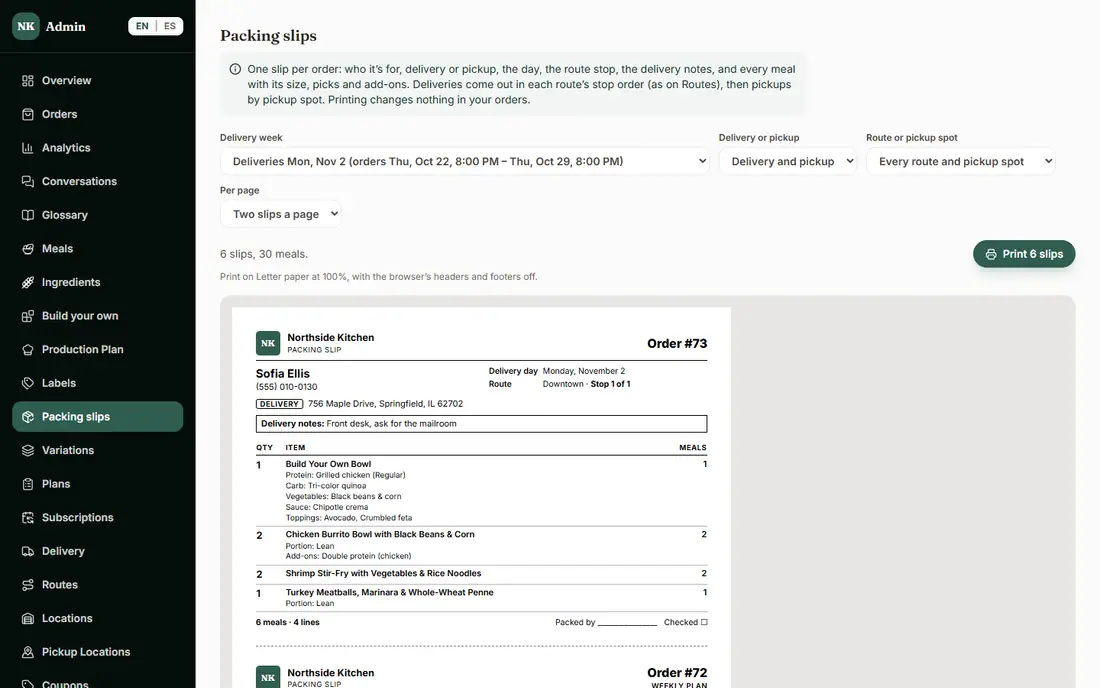
One slip per order for whoever packs the bag and the driver: the customer and phone, the delivery address or pickup spot, the day, the route and stop number (in the same order as Routes), the delivery notes, and every meal with its size, choices and add-ons. Print two slips to a page or one.

The admin Packing slips page with a printable slip
A packing slip, ready to print.

What is included, and in which plan

Each plan includes everything in the plans before it.

  • Delivery zones

    ZIP code zones with their own fee, minimum and day, plus the delivery areas page.

    In Basic and above
  • Delivery routes

    Route sheets for drivers, with stops put in a sensible order.

    In Basic and above
  • Pickup locations

    Places where customers can pick up their order.

    In Basic and above
  • Packing slips

    A printable slip for each order bag.

    In Basic and above

How it helps you grow

  • Less admin time on delivery day

    Routes and packing slips come straight from the week's orders, so you are not rebuilding the day by hand.

  • Fewer mistakes at the door

    Slips list the route and stop number in the same order as the route sheet, so the bag, the driver and the list agree.

  • More customers served

    Someone outside your zones is not turned away: they are offered pickup. And each zone can have its own day, fee and minimum, so every area you serve makes sense for you.

Try it in the demo

These links open the exact screens in the live demo, in a new tab. Nothing in the demo is real: no payments, no emails, no customers.

Admin links ask you to click Sign In once. The demo fills in the sample login for you.

Questions owners ask

Can each delivery zone have its own day, fee and minimum?

Yes. Each zone is a list of ZIP codes with its own delivery day, fee, minimum order and free-delivery amount. Where the store has a minimum order too, the higher one applies.

What happens if a customer is outside my zones?

They are told you do not deliver there and offered your pickup locations instead, so they can still order.

Does it optimize my routes?

It puts each route's stops in order starting from your kitchen, nearest stop next. For anything more, download a CSV for a route-planning app or open the route in Google Maps.

Do routes need delivery zones to be turned on?

Yes. Delivery routes depend on Delivery zones, so turning zones off also turns routes off. Turning a feature off never deletes anything, and turning it back on brings it all back.

Related features

  • Kitchen operations

    Production plan, prep and shopping lists, inventory, ingredient costs and suppliers, and more than one kitchen.

  • Labels and use-by dates

    Printable labels with nutrition facts, ingredients, allergens and use-by dates, from your own menu data.

  • Subscriptions and recurring revenue

    Weekly plans customers manage themselves: skip, pause, swap or cancel, billed every week.

All features →

Want to see it with your menu?

We set it up for you and move your existing customers over. Call us or talk to Alex, and we will show you how it would work for your business. You can also read the demo guide first.