Labels and use-by dates

Meal Prep Labels with Nutrition Facts and Use-By Dates

Print a label for every meal from your own menu data: nutrition panel, ingredients, allergens, packed and use-by dates. You review them before you use them.

The problem

Labels eat my Sunday. I retype the ingredients and calories for every meal, and I am never sure the use-by date is right by the time it is on the container.

I want labels that come from the same recipes as my menu, in the size my printer takes.

How it works

Real screens from the live demo, with sample data only.

What you see in the admin

Print the week's labels in the size you use

From the Production Plan, print a label for every meal to cook that week, or for one meal, or one per order with the customer's name. Choose 2 by 4 inch or 3 and one-third by 4 inch sheets (Avery 5163/8163 and 5164/8164), or 4 by 6 inch thermal labels, and see the print preview first.
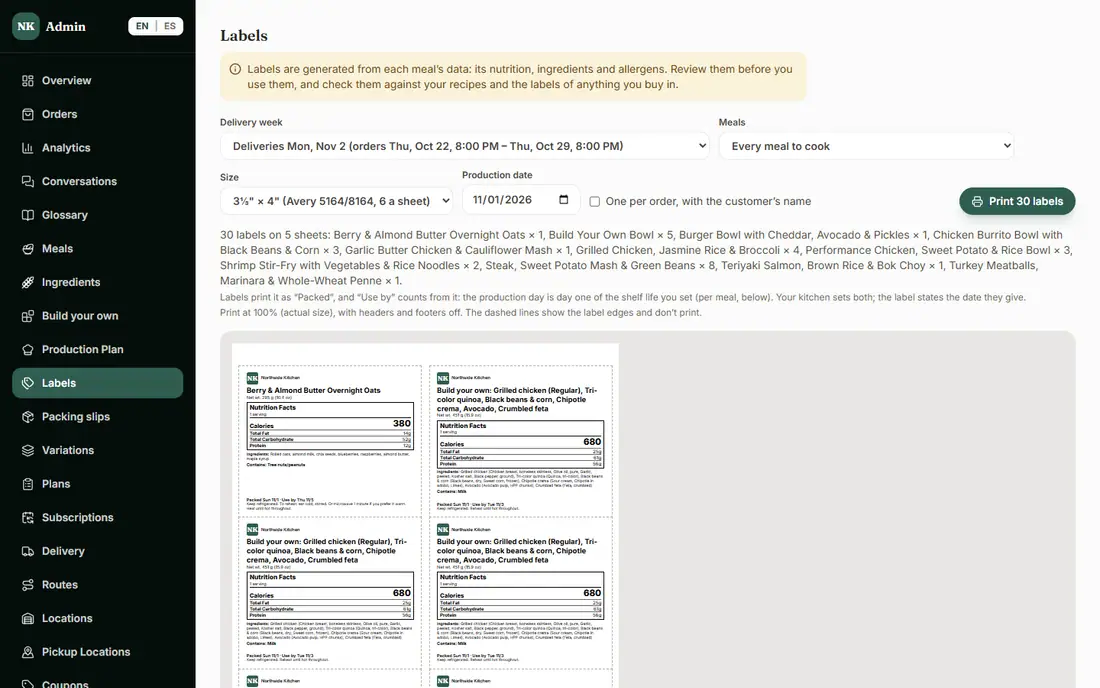
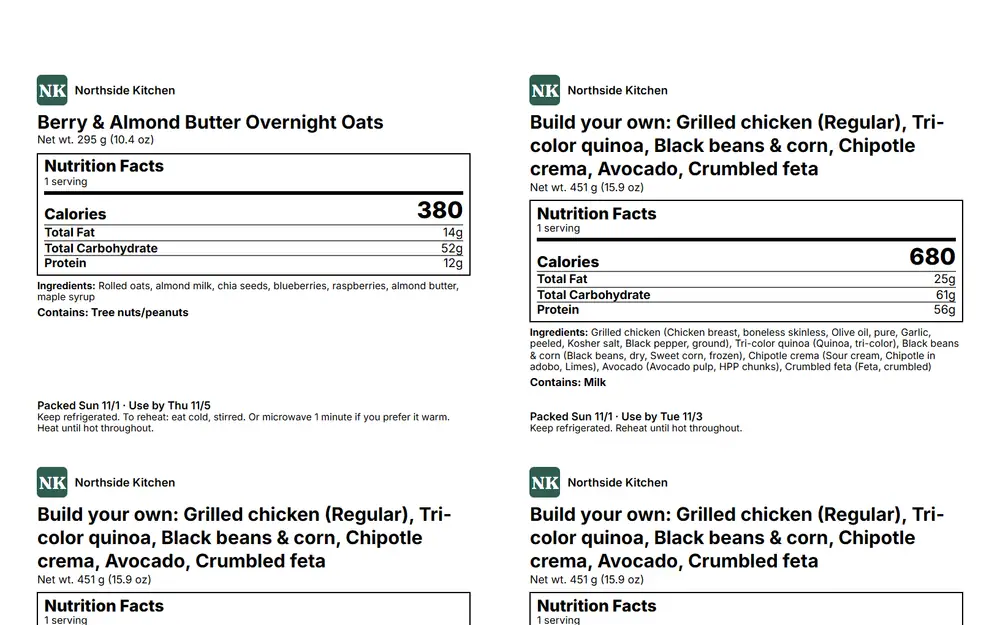
The admin Labels page with size options, a production date and a print preview
Choose a size, see the preview, print.

What you see in the admin

What is on each label

Your name and logo, the meal and portion, a nutrition panel, the ingredients, a Contains line for the major allergens (and Possible lines for sauces you buy in), packed and use-by dates, and storage and reheating.

A printed label sheet with nutrition facts, ingredients, allergens and packed and use-by dates
Sample labels from the demo.

What you see in the admin

Dates come from your own shelf life

You set each meal's shelf life. Labels print the production day as Packed, and Use by counts from it, with the production day as day one. Your kitchen sets both, and the label states the date you give.

What you see in the admin

Labels come from your data, for you to review

Labels are generated from each meal's data: its nutrition, ingredients and allergens. Review them before you use them, and check them against your recipes and the labels of anything you buy in. You are responsible for what is on your labels.

What is included, and in which plan

Each plan includes everything in the plans before it.

  • Labels

    Printable meal labels with use-by dates.

    In Basic and above

How it helps you grow

  • Less admin time

    Nothing is retyped: the label comes from the same meal data as your menu and your production plan.

  • One source of truth

    When you change a recipe or an ingredient, the nutrition, allergens and label change with it, instead of three documents drifting apart.

  • Customers see what they are eating

    The same nutrition, ingredients and allergens are on each meal's page, so what is on the container matches what they ordered.

Try it in the demo

These links open the exact screens in the live demo, in a new tab. Nothing in the demo is real: no payments, no emails, no customers.

Admin links ask you to click Sign In once. The demo fills in the sample login for you.

Questions owners ask

What label sizes can I print?

Avery sheets at 2 by 4 inches (10 a sheet) or 3 and one-third by 4 inches (6 a sheet), or 4 by 6 inch thermal labels, one per label. You see a print preview first.

Where do the nutrition numbers and allergens on a label come from?

From your own meal data: the recipe, your Ingredients list and the allergens you have listed. The system generates the label from it, and you review it before you use it.

Does this make my labels correct for me?

No. The labels are built from your data for you to review, not legal or regulatory advice. Check them against your recipes and the labels of anything you buy in, and ask whoever advises you on labeling rules if you are unsure.

Can I print a label for each order with the customer's name?

Yes. You can print a label for every meal to cook, one meal's labels, or one per order with the customer's name.

Related features

  • Kitchen operations

    Production plan, prep and shopping lists, inventory, ingredient costs and suppliers, and more than one kitchen.

  • Delivery and pickup

    ZIP zones, delivery days and deadlines, pickup locations, route sheets and packing slips.

  • Bigger orders

    Build-your-own meals with macros, sizes and add-ons, packs of meals, and a minimum order.

All features →

Want to see it with your menu?

We set it up for you and move your existing customers over. Call us or talk to Alex, and we will show you how it would work for your business. You can also read the demo guide first.