AI tools

AI Tools for Meal Prep Businesses: Customer Chat, Food Photo Styling and Trend Finder

A chat that answers customers' menu questions from your own menu, styling options for your food photos, and ideas for new meals. You stay in charge of all of it.

The problem

Customers ask me the same menu questions at all hours, and I answer them between batches. Photos of every new dish take forever. And I never know what new meal to add next.

I want help with all three, but I do not want a robot making promises about allergies or putting things on my menu that I did not approve.

How it works

Real screens from the live demo, with sample data only.

What your customer sees

A chat on your storefront that answers from your menu

A chat button sits in the corner of every storefront page. Customers ask in their own words, like what chicken meals you have, and it answers from your own menu: the meals that fit, with your prices and an Add button the customer presses themselves. It answers in English or Spanish, following the storefront's language, and it cannot place orders, change a plan or promise a discount. When it does not know something it says so and offers to pass the question to you.
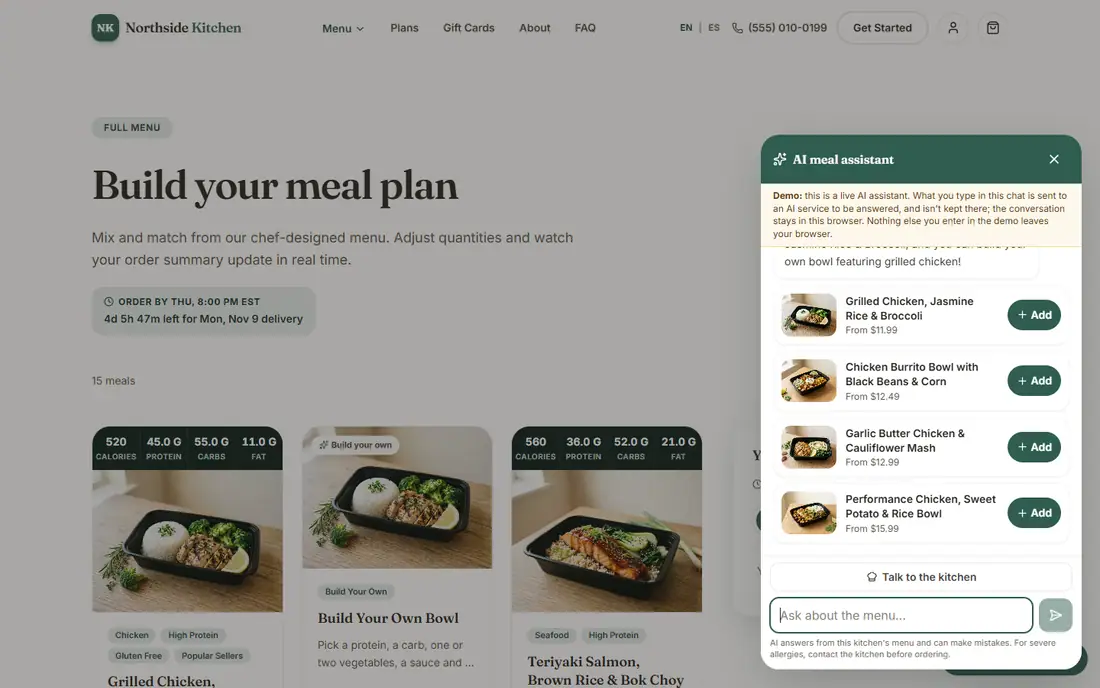
The chat assistant answering a menu question with meals, prices and Add buttons
The assistant answers from the sample menu.

What your customer sees

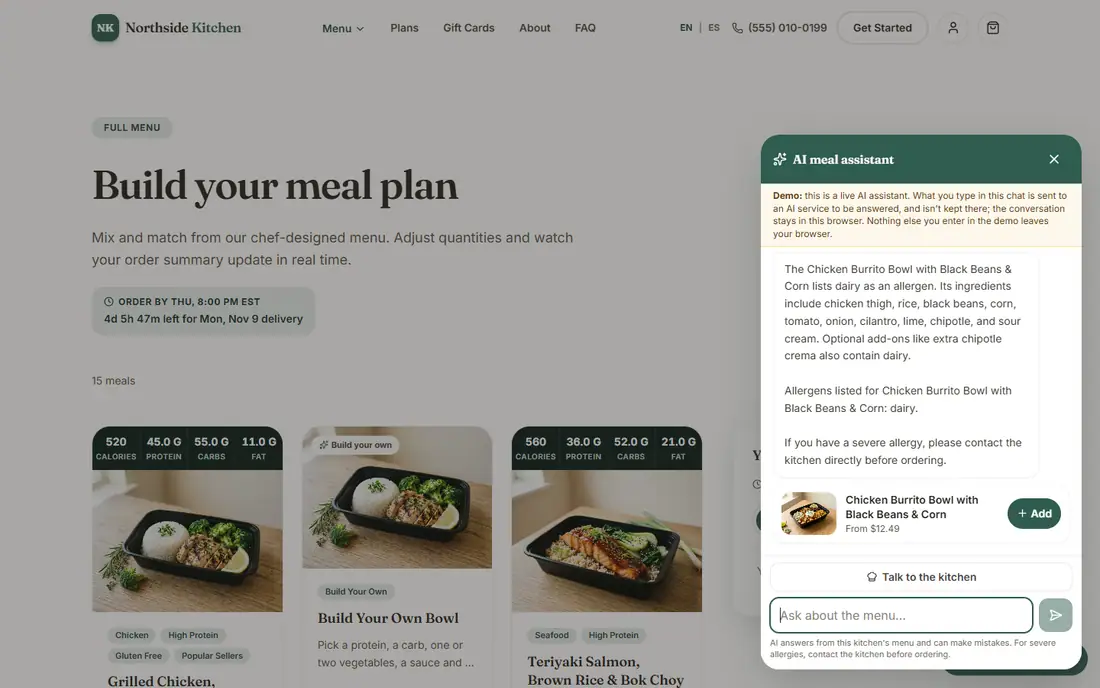
Allergy questions go to your kitchen

Any question that mentions allergies gets a plain reminder: if you have a severe allergy, please contact the kitchen directly before ordering. The assistant only repeats the allergens you have listed for a meal. It never says a meal is safe for an allergy, and it does not give medical or diet advice. Talk to the kitchen passes the conversation to you, and name, email and phone are all optional.

The assistant listing a meal's allergens with a reminder to contact the kitchen
An allergy question: the listed allergens, and a reminder to contact the kitchen.

What you see in the admin

Conversations: what customers ask, and what your menu is missing

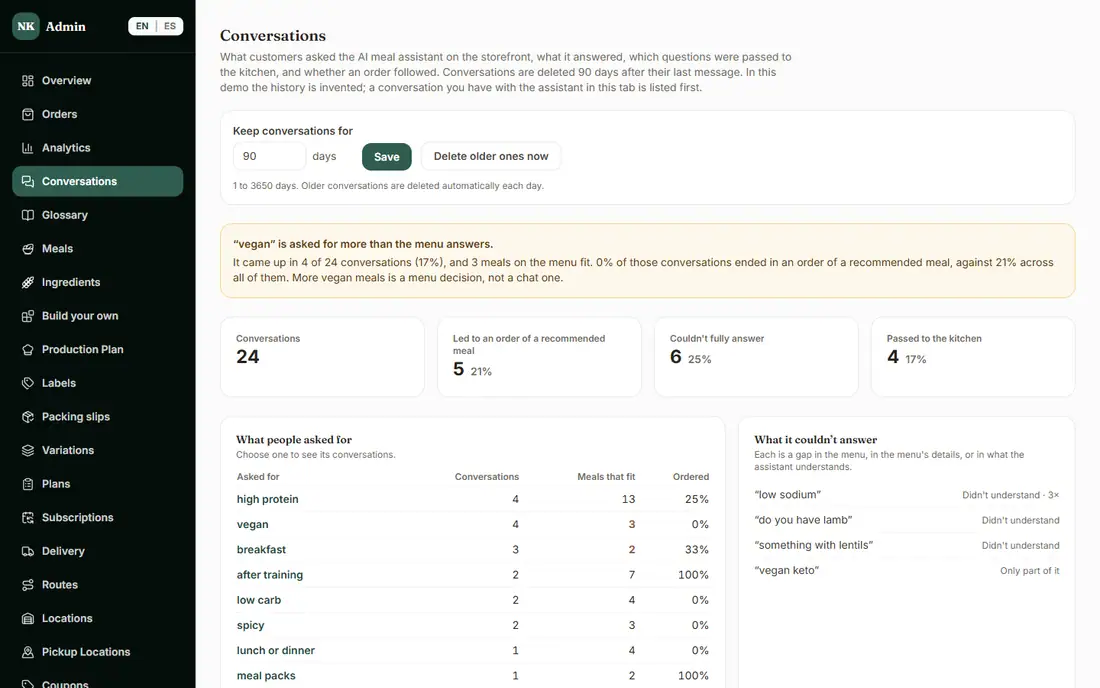
Every chat is saved on the Conversations page. Tiles count conversations, how many led to an order of a recommended meal, how many it could not fully answer and how many were passed to the kitchen. Below, what people asked for most and what it could not answer: a quick read on what to add to your menu. Conversations are deleted after the number of days you choose, 90 by default. In the demo the history is invented, and a chat you have in the demo is listed first.

The admin Conversations page with what customers asked for and what the assistant could not answer
Conversations. The history in the demo is invented.

What you see in the admin

Food photo styling for your real dishes

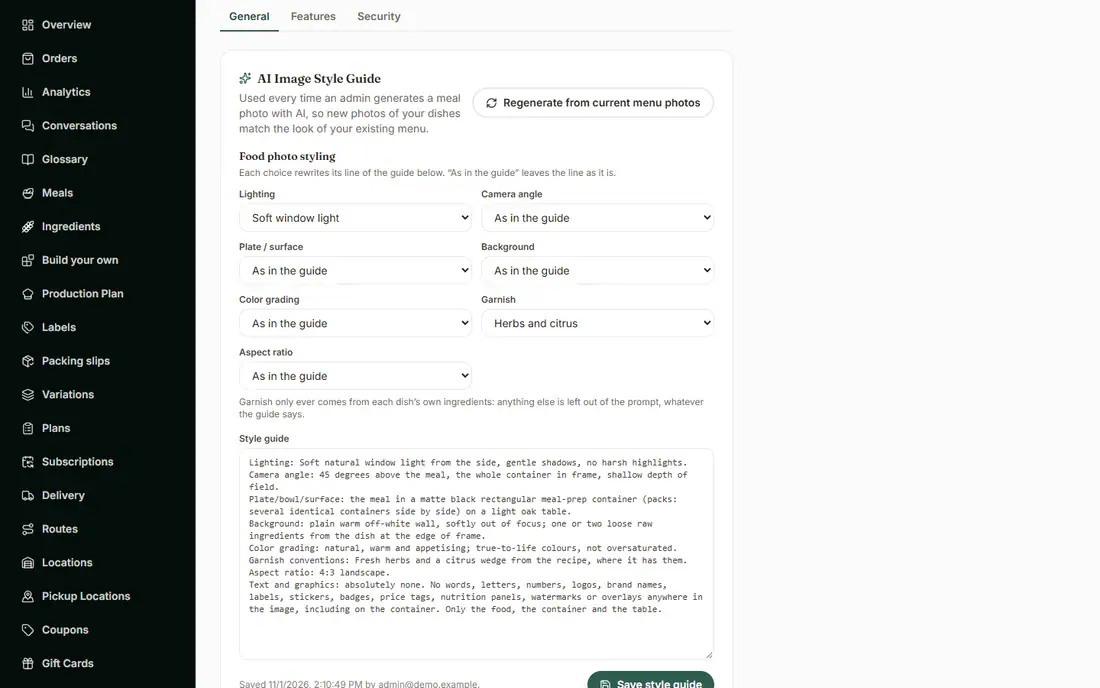
Choose the lighting, camera angle, plate or surface, background, color grading (from true to life up to natural, never oversaturated), garnish and shape, starting from a style guide written from your own menu photos. Garnish only ever comes from each dish's own ingredients. Every AI photo is checked against the dish's ingredients and allergens, and a photo that shows anything that is not in the recipe is not used. A photo that passes still waits for your approval before it appears on your menu. In the public demo the styling options work and making photos is turned off for visitors, since each is a paid call; we show it live on a walkthrough call.

The photo styling options in the admin Settings
Photo styling options in Settings.

What you see in the admin

Trend Finder: ideas for new meals, with their sources

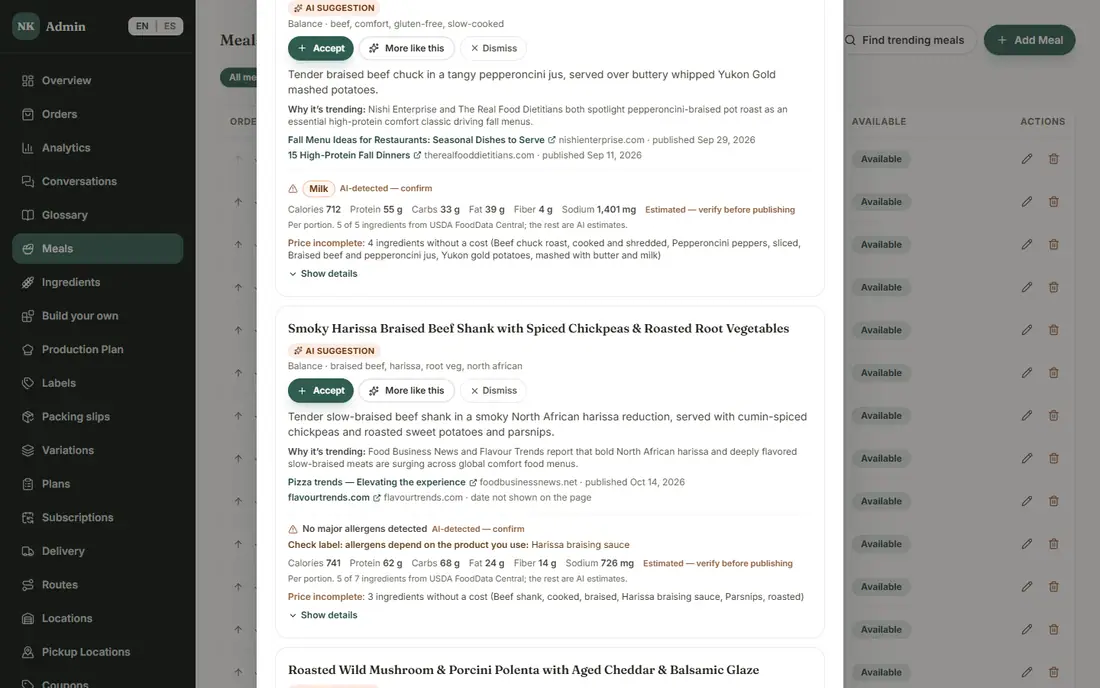
Choose how many ideas, a focus like high-protein or vegan, and a season. Each idea says why it is trending and links the recent articles that show it, from at least two publications, with their dates. Show details lists every ingredient with its nutrition and cost, and anything it estimates is marked for you to confirm. Accept turns an idea into a draft meal that stays hidden from customers until you review it and publish it. The demo shows saved results from real searches; on your own site it searches the web live.

A Trend Finder idea with why it is trending and its sources
A Trend Finder idea with its sources.

What is included, and in which plan

Each plan includes everything in the plans before it.

  • Meal assistant (AI)

    A chat that helps customers choose meals, and the page of what they asked.

    In the Pro plan
  • AI meal photos

    Generate meal photos that match your menu's style.

    In the Pro plan
  • Trend Finder

    Ideas for new meals from what's trending, with cost estimates.

    In the Pro plan

How it helps you grow

  • Fewer repeat questions answered by hand

    The chat handles the menu questions and passes you only the ones it cannot answer, with the contact details the customer chose to leave.

  • A list of what your menu is missing

    The questions it could not answer are a plain list of what customers want that you do not offer yet.

  • More menu ideas, without guessing

    Trend Finder brings sourced ideas with ingredients and costs, and you decide what becomes a meal.

  • Photos that match your menu

    Styling options keep new photos in the style of the ones you already have, and nothing goes live without your approval.

Try it in the demo

These links open the exact screens in the live demo, in a new tab. Nothing in the demo is real: no payments, no emails, no customers.

Admin links ask you to click Sign In once. The demo fills in the sample login for you.

Questions owners ask

Will the assistant tell a customer a meal is safe for their allergy?

No. It only repeats the allergens you have listed for a meal and always adds a reminder to contact the kitchen directly before ordering. It does not say a meal is safe, and it does not give medical or diet advice.

Can the assistant take orders or give discounts?

No. It cannot place orders, change a plan or promise a discount. It shows meals with your prices and an Add button the customer presses themselves.

Does the chat work in Spanish?

Yes. It answers in English or Spanish, following the language of the storefront.

Why does the demo limit how many questions I can ask?

In the demo it is a live AI assistant answering from the sample menu, and each visitor gets a few questions a day. At the limit it says so, and a walkthrough call shows more.

Do AI photos go on my menu on their own?

No. Each photo is checked against the dish's ingredients and allergens, and one that passes still waits for your approval. The check catches visible extras only, so you stay responsible for your menu and labels.

Related features

All features →

Want to see it with your menu?

We set it up for you and move your existing customers over. Call us or talk to Alex, and we will show you how it would work for your business. You can also read the demo guide first.